
AI-supported QA: knowledge, support and tests from one source
We use AI where it secures quality: for requirements and test cases in a running project, and as a shared knowledge base for support, development and test. The AI makes proposals, a human reviews and approves. The approach also works independently of any one tool.
AI agents for requirements and test cases
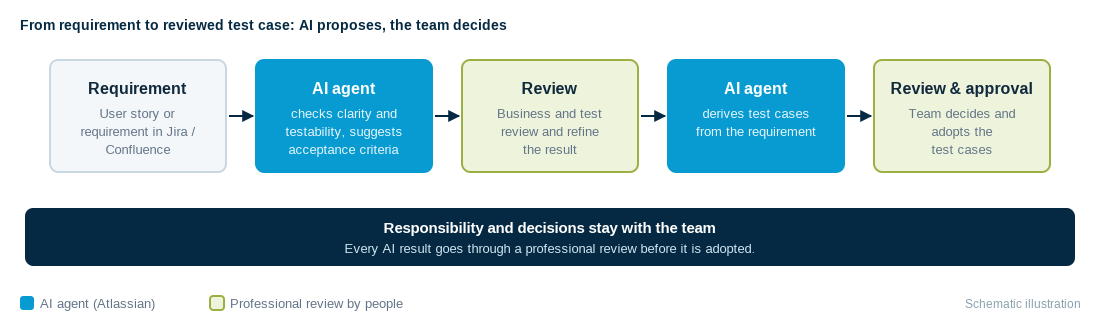
In our projects we use Atlassian's AI agents in Jira and Confluence. They support requirements analysis and the design of test cases. The AI makes proposals; the team reviews and decides, so professional responsibility always stays with the team.
- Check requirements for clarity, completeness and testability
- Derive and refine acceptance criteria from user stories
- Derive test cases from requirements and keep them consistent
- Review workflows: proposals are professionally reviewed before they are adopted
How requirements are clarified together beforehand: Example Mapping and BDD →
One knowledge base, many results
Taking the principle further means bundling all product knowledge. Everything known about the product ends up in one knowledge base. The AI assistant works only from this base and names its source, so its results can be checked.
- Sources
What exists
Documentation, backlog, support tickets and code, often grown over the years
- Knowledge base
One source
Every feature described the same way, with acceptance criteria and business rules
- AI assistant
Works only from the base
Produces the results and names the source each time
- Results
From the same base
Answers, support drafts, developer tickets, help articles and automated tests
- Approval
A human reviews
Nothing goes out without review
Like an operating system, the knowledge base runs underneath the daily work of support, development and test.
Even without Atlassian: your content stays usable
Not every company wants to or can stay with Atlassian, for example because a move to the cloud is out of the question or data protection requirements speak against it. The knowledge base makes you independent of the tool: an AI reads documents and content, brings them into a uniform structure, and they stay usable.
- 1
Read the existing material
Requirements, documentation, test cases and tickets from the current system are read and prepared by the AI.
- 2
Store it uniformly
The content is kept in an open format, Markdown with Git, and belongs to you, independent of any tool vendor.
- 3
Keep using it or switch
The AI keeps working with the knowledge base. It can also serve as the source for moving content into a new tool or system instead of re-entering it by hand.
- A move to the cloud is not wanted or not possible.
- Data protection or compliance requirements limit the use of an existing tool.
- The company wants to change tools and take its content along.
- Existing documents are to be read by an AI and kept in use.
When the knowledge base pays off
It suits software companies for which several of these points apply:
- The software has grown over the years and no current description exists.
- Knowledge rests with a few key people.
- Support keeps answering the same questions.
- Developer tickets have no clear functional reference.
- Testing is mostly manual.
- Jira, Confluence or a helpdesk is in use.
What changes in daily work
Tasks that today depend on individuals or spot checks afterwards run by fixed rules and from the same source.
| Task | Before | After |
|---|---|---|
| Product question | Ask colleagues, search the code | Answer from the documentation, with source |
| Support reply | Depends on one person | Draft from specification and proven answers |
| Developer ticket | Free text | With feature, violated rule and steps |
| Checking a fix | Spot check | Fixed checklist, down to PDF, email and export |
| Regression test | Manual before the release | Automated tests, every night |
What you get
Knowledge
Stays in the company, even when people leave. New colleagues look things up themselves.
Quality
Answers, tickets and documents follow the same rules and name their source.
Speed
Recurring work runs as a fixed process instead of being created from scratch each time.
Collaboration
Business, support and development work from the same product description. Help articles for end customers come from the same base.
Release safety
Automated tests show before the release whether something has broken.
Growth
More customers do not mean proportionally more staff for support and test.
What was possible in five months
A SaaS platform that had grown over the years. Before, the knowledge lay in people’s heads, old wiki pages, Jira, support tickets and the code.
- 150+
Features
fully documented, in around 50 product areas
- ~3,000
Legacy support tickets
condensed into around 30 topic overviews
- 1,500+
Test scenarios
written from the acceptance criteria
- ~250
Automated tests
per run, every night
Values rounded. One person at the core built the system; support and development now work with it as well.
Seven steps, proven in the reference project
Take over the existing material
Bring documentation, backlog and tickets into a uniform structure.
Set templates and rules
Describe every feature the same way, with acceptance criteria and business rules.
Enrich the knowledge
Analyse the support archive, link the code to the features.
Define fixed processes
Around 17 processes, from the support reply to the sprint check.
Connect the systems
Jira, Confluence, test management, helpdesk and code.
Tests from the business logic
Derive them from the acceptance criteria and automate them, core process first.
More on test automation →A human approves
Nothing goes out without review.
Standard building blocks, manageable effort
Technologies used
- Knowledge base in Markdown with Git
- AI assistant Claude (Anthropic)
- Interfaces to Jira, Confluence, Xray and helpdesk
- Test automation with Playwright and Cucumber in GitLab CI
The value lies in the structure, the rules and the processes on top.
Running costs
They are mainly the AI licence. Large bulk jobs such as analysing an archive run on cheaper AI models. The more expensive model is kept for decisions and reviews.
| Phase | Period | Result |
|---|---|---|
| Start | Month 1 | Existing material taken over, structure and templates in place |
| Build-up | Months 2 to 3 | Features described, support archive analysed, systems connected |
| Expansion | Months 4 to 5 | Fixed processes in use, test cases from the acceptance criteria, nightly automation |
AI-supported QA: questions and answers
What is the difference between the AI agents in a project and the knowledge base?
The agents in Jira and Confluence support requirements and test cases in a running project. The knowledge base bundles all product knowledge and feeds answers, tickets and tests from it. The two can be combined; the knowledge base is the bigger step.
Does this also work without Atlassian?
Yes. The knowledge base is kept in an open format and is not tied to any one tool. Documents and content from existing systems can be read, structured and kept in use by the AI, also as a basis for a later switch.
What about data protection?
Before the project starts, we agree with you which content the AI processes and where, and align this with your requirements.
Who is the knowledge base for?
For software companies whose software has grown over the years, whose knowledge rests with a few people and who mostly test manually. Jira, Confluence or a helpdesk are usually already in place.
How do you prevent the AI from making things up?
The assistant works only from the knowledge base and names the source for every result. A human reviews and approves. Nothing goes out unchecked.
How long does the set-up take?
In the reference project, one person at the core built the system in five months. The effort depends on the scope and condition of the existing material.
What does running it cost?
Running costs are mainly the AI licence. Large bulk jobs such as analysing an archive run on cheaper models; the more expensive model is kept for decisions and reviews.
Which systems can be connected?
Typically Jira, Confluence, Xray or another test management tool, a helpdesk and the code repository. The approach can be adapted to your landscape.
Can this be transferred to other areas?
Yes, the principle also works for internal processes, sales or onboarding. In the reference project it currently runs for product, support, development and test.
Does this work with SAP Cloud ALM?
Yes. The knowledge base is tool-independent. Content from SAP Cloud ALM, for example test cases and requirements, can be read and kept in use, for instance via the Excel export and when moving from SAP Solution Manager.
Let us talk about your AI-supported QA
Briefly describe your situation. We will get back to you with a first assessment.